
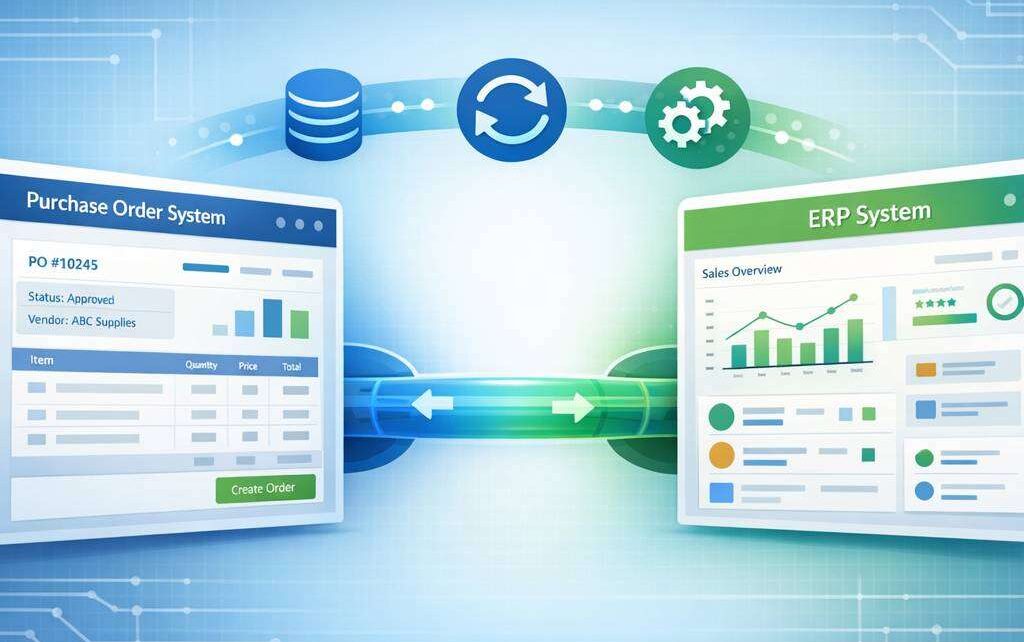
In today’s fast-moving business environment, synchronising procurement processes with enterprise resource planning (ERP) systems is essential for operational visibility, cost control, and strategic supplier management. A well-integrated purchase ordering system ensures that purchasing activities align with finance, inventory, and production planning, delivering real-time data that drives smarter decisions. This guide outlines best practices for integrating a purchase ordering system with your ERP, with practical steps, common pitfalls, and actionable considerations.
Understanding the value of integration
A seamless interface between your ERP and a purchase order management system creates a single source of truth for procurement data. Benefits include:
- Improved data accuracy through automated data capture and validation, reducing manual entry errors.
- Enhanced spend visibility by linking purchase orders to budgets, encumbrances, and supplier performance metrics.
- Streamlined workflows, from requisition to approval, purchase order creation, receipt, and payment.
- Increased control over procurement activities via role-based access, audit trails, and standardised processes.
- Greater efficiency in supplier onboarding and performance analytics through integrated supplier master data.
Choosing software for purchase orders that can communicate effectively with your ERP is foundational to realising these benefits.
Assessing compatibility and architecture
Before you begin integration, map out the current architecture and identify integration points. Key considerations include:
- Data model alignment: Ensure consistent field definitions for requisition lines, purchase orders, receipts, invoices, and supplier data. This reduces the need for complex mappings and custom code.
- Integration patterns: Decide whether to use point-to-point connectors, middleware, or an iPaaS (integration platform as a service). Middleware or iPaaS solutions often offer prebuilt adapters, error handling, and monitoring capabilities that simplify maintenance.
- Real-time vs. batch: Determine which processes require real-time updates (e.g., PO issuance and receipt) and which can run on a schedule (e.g., nightly expenditure reporting).
- Master data governance: Establish a single source of truth for suppliers, items, units of measure, and tax rules to prevent discrepancies across systems.
- Security and compliance: Enforce encryption, access controls, and audit trails to meet governance requirements and protect sensitive purchasing data.
A robust architectural assessment reduces rework and ensures that the po system software chosen will scale with your organisation.
Selecting the right purchase orders software
When evaluating a purchasing order system, consider both functionality and the ease of integration with your ERP. Key features to look for include:
- Order orchestration: Ability to convert requisitions into purchase orders automatically, with configurable approval workflows and budget checks.
- Supplier collaboration: Electronic tendering, supplier portals, and the ability to send and receive online purchase orders, acknowledgements, and changes.
- Dose of control: Compliance checks for contract terms, price variances, and policy enforcement at the point of creation.
- Receiving and invoice integration: Seamless links between receipt of goods, three-way matching, and accounts payable.
- Reporting and analytics: Real-time dashboards for spend analytics, supplier performance, and procurement cycle times.
If you operate in high-velocity procurement environments, prioritise a system with purchase orders software that supports bulk PO creation, mass updates, and automated exception handling.
Designing a phased integration plan
A pragmatic, phased approach reduces risk and accelerates value delivery. A typical plan includes:
- Phase 1: Foundation alignment. Harmonise master data, establish common tax rules, and implement essential interfaces for PO creation and receipt. Focus on a minimal viable integration that covers the critical touchpoints (PO generation, goods receipt, and matching to invoices).
- Phase 2: Process automation. Extend automation to requisition approvals, budget checks, and supplier communications. Introduce digital purchase order software features such as e-signature approvals and online purchase orders for suppliers.
- Phase 3: Extended analytics. Enrich ERP data with procurement metrics, KPI dashboards, and supplier performance ratings. Enable predictive insights for demand planning and procurement planning.
- Phase 4: Optimisation and governance. Implement ongoing data quality routines, de-duplication, and governance policies. Establish change management practices to maximise user adoption across departments.
During each phase, validate data integrity end-to-end and perform user acceptance testing with procurement, finance, and IT stakeholders. This approach helps ensure a smooth transition and measurable returns.
Implementing data mapping and workflow orchestration
Effective integration relies on precise data mapping and coherent workflow orchestration. Consider the following:
- Mapping rules: Define how fields in the purchase order system align with ERP fields (for example, cost centre, currency, and tax codes). Use automated transformation rules to standardise units of measure and price formats.
- Workflow alignment: Reconcile approval hierarchies between systems. If your ERP uses a different approval matrix, implement a cross-system workflow bridge to preserve governance while avoiding bottlenecks.
- Exception handling: Design clear processes for exceptions such as price changes post-PO, partial receipts, or vendor changes. Automated alerts should flag discrepancies for timely resolution.
- Data quality checks: Implement validation steps at the point of PO creation, receipt, and invoice matching. Regular data clean-up cycles prevent stale or inaccurate supplier records from impacting downstream processes.
A well-constructed data map and workflow will significantly reduce manual intervention and improve procurement reliability.
A reliable purchase ordering system streamlines procurement, reduces processing time, and improves supplier collaboration. It provides real-time visibility, standardized workflows, and error prevention to cut costs. For more scalable solutions, explore cloud-based options. https://cloudb2b.co.uk/
Ensuring user adoption and governance
Technology alone does not deliver results; people do. To maximise adoption of your purchase order management system within the ERP ecosystem:
- Communicate benefits clearly: Highlight improved processing times, reduced errors, and stronger control over spend.
- Provide role-based training: Create targeted training for buyers, approvers, receiving staff, and finance personnel. Use job aids, checklists, and quick reference guides.
- Establish governance policies: Define who can create, modify, or cancel POs, who can approve budgets, and how changes are tracked across systems.
- Monitor and optimise: Use dashboards to monitor cycle times, approval bottlenecks, and supplier performance. Regularly review and refine the integration based on feedback.
Discover how a purchase ordering system can streamline procurement, reduce errors, and boost efficiency across teams. Businesses of all sizes benefit from centralized controls, real-time status updates, and automated approvals. By standardizing workflows and suppliers, you save time and成本 while improving transparency. Explore features, compatibility, and scalable plans to fit your organization’s needs.
A purchase ordering system streamlines procurement, improving accountability and efficiency for teams managing suppliers, budgets, and approvals. It integrates catalogs, approvals, and tracking to reduce errors and delays. For detailed guidance, visit https://procurement.colostate.edu/purchase-order-faq-2/.
Practical tips for a successful rollout
- Start with a vendor-neutral stance: If possible, choose a po system software that offers robust APIs and industry-standard connectors to ensure future-proofing.
- Plan for change management: Allocate resources for training and support during go-live. A staged rollout reduces disruption.
- Prioritise data quality: Cleanse supplier and item data before integration. Poor master data is a leading cause of PO errors.
- Maintain security discipline: Enforce least-privilege access and secure data transmission between systems.
By leveraging a purchasing order system that interoperates smoothly with your ERP, organisations gain tighter control over procurement, better budget adherence, and clearer supplier insights. Whether you are implementing online purchase orders for suppliers or adopting a digital purchase order software suite across departments, a thoughtful integration strategy will yield measurable operational advantages. Remember to evaluate options using a practical mix of features, integration readiness, and governance capabilities, and you will be well on your way to achieving procurement excellence.
A purchase ordering system streamlines procurement, boosts transparency, and controls spend. It automates approvals, tracks status, and centralizes supplier data for strategic decisions. Organizations gain efficiency, reduce errors, and improve compliance. Learn more about best practices and implementation insights at the following resource: https://planergy.com/blog/purpose-purchase-order-system/
FAQ: Purchase Ordering System
What is a purchase ordering system?
A purchase ordering system is software or a process that automates the creation, approval, and tracking of purchase orders (POs) within an organisation. It streamlines supplier communication, ensures compliance with purchasing policies, and provides visibility into spending and procurement workflows.
What are the main benefits of implementing a purchase ordering system?
- Reduces manual data entry and errors
- Accelerates the procurement cycle with automated approvals
- Improves budget control and policy compliance
- Enhances supplier management and purchase visibility
- Centralizes PO records for auditing and reporting
- Integrates with ERP, accounting, and inventory systems
How does a purchase ordering system differ from an invoicing system?
A purchase ordering system focuses on requesting and approving purchases before goods or services are received, while an invoicing system handles billing, payment processing, and reconciliation after delivery. Some solutions combine both functions, but their core workflows (PO creation vs. invoice processing) are distinct.
What features should I look for in a purchase ordering system?
- PO creation, editing, and standardised templates
- Approval workflows with role-based access
- supplier management and contract compliance
- budget checks and spend controls
- real-time PO status tracking and fulfillment visibility
- integration with ERP, accounting, inventory, and eProcurement
- audit trails and reporting/dashboards
- mobile access and approval capabilities
- invoice reconciliation and matching (if integrated)
Can a purchase ordering system help with supplier risk management?
Yes. Many systems include supplier onboarding, performance tracking, contract compliance, lead times, and quality metrics. These features help identify risky suppliers and maintain better supplier relationships.
How does the approval workflow work in a purchase ordering system?
Typically, a PO is created and routed through predefined approval steps based on criteria such as amount, department, or item type. Approvers can review, comment, approve, or reject. The system enforces deadlines and provides notifications to keep the process moving.
Is a purchase ordering system suitable for small businesses?
Absolutely. Small businesses can benefit from reduced manual work, improved control over spending, and better supplier relationships. Many solutions offer scalable pricing and tiered features suitable for smaller teams.
What are the deployment options for a purchase ordering system?
- Cloud-based (SaaS): accessible via web or mobile with regular updates
- On-premises: installed locally, with in-house hosting and maintenance
- Hybrid: a combination of cloud and on-premises components
How does integration with other systems work?
Most purchase ordering systems offer APIs or pre-built connectors to:
- ERP and accounting software (for financial posting and reconciliation)
- Inventory management (to align stock levels with POs)
- eProcurement platforms (to streamline supplier catalogs)
- Human resources or expense systems (for indirect purchases)
- Email, CRM, or collaboration tools for notifications
What security features should I expect?
- Role-based access control (RBAC)
- Data encryption in transit and at rest
- Audit trails and change history
- Single sign-on (SSO) and multi-factor authentication (MFA)
- Regular backups and disaster recovery
- Vendor security and privacy compliance (e.g., GDPR, SOC 2)
How long does it take to implement a purchase ordering system?
Implementation timelines vary by scope and complexity but typically range from a few weeks to a few months. Factors include data migration, integration requirements, process redesign, user training, and change management.
What is the typical return on investment (ROI) for a purchase ordering system?
ROI comes from reduced maverick spending, faster cycle times, fewer supplier errors, improved budget compliance, and better financial reporting. A well-implemented system can shorten procurement cycles by 20-50% and reduce processing costs.
Do purchase ordering systems support mobile use?
Many do. Mobile apps let users create POs, approve requests, scan receipts, and receive supplier updates on the go, increasing responsiveness and throughput.
How do I choose the right purchase ordering system for my business?
- Analyze your procurement processes and identify bottlenecks
- Determine required features and integration needs
- Assess scalability, security, and compliance requirements
- Request demos and references from similar industries
- Consider total cost of ownership, not just upfront price
- Plan for data migration, change management, and user training
What are common implementation challenges, and how can I mitigate them?
- Resistance to change: involve stakeholders early and provide training
- Data quality issues: clean and standardise master data before migration
- Integration complexity: map data flows and involve IT early
- User adoption: design intuitive workflows and offer ongoing support
Is there a free trial or demo available?
Many vendors offer free trials, sandbox environments, or live demos. It’s a good idea to test end-to-end scenarios (PO creation, approvals, supplier updates, and reporting) with real users.
How does a purchase ordering system handle compliance and policy enforcement?
The system enforces purchasing policies through approval routing, spend limits, mandatory supplier selection from approved catalogs, and automated alerts for deviations. It also provides audit trails for governance and regulatory compliance.